Hello
I hope this question is appropriate here. If not, let me know where I can ask these questions.
I'm a beginner at SDRs but it's not the radio portion that I'm new at. RF electronics and processing is my profession but it's all of the software that bogs me down. Git, GNU and all this stuff is a bit overwhelming for someone who doesn't use this stuff very often. I've used Visual Studio and I've programmed PIC devices but that's about it.
So...where does one begin with all of this? I have NOT purchased the bladeRF yet as I wanted to see if I could set up the appropriate software first. If it becomes too much then I can skip on making the big purchase. I'm exclusively a Windows user so I do NOT want to be fooling around with Linux at this point. I'll get buried quite fast if I do (hell...I'm already buried). So with this background a few questions:
1) What is the difference between the bladeRF Windows installation and building it from source? It seems an awful lot of trouble to build it. I've gone through the Wiki and it's helpful guides but there is a LOT going there that I just know nothing about. It is very difficult to follow at times since I don't know much of the jargon. What is the upside of "building" instead of just installing?
2) Does the radio allow you to change what goes into the FPGA? One of my purposes in buying this radio is to be able to play around with DSP filters and the like. Such as inputting signals (thru ADC), processing them...and the output through a DAC. I'd like to implement FFTs, FIR filters and Hilbert transforms if possible. I'm guessing but I assume this would be done through the FPGA. If this can be done what software is normally used?
3) Is there software available to control the radio or it something you have to create yourself?
4) I have MATLAB available to me and after looking around a bit this could be helpful. In fact, that one of the reasons I don't want to bother with Linux since if I'm not using Windows I can't access my MATLAB. Or is there something I'm missing here?
5) GNU Radio seems nice. Is there a Windows version? I'm sure it's used in Linux but that's not for me. As to GNU Radio is that something that MATLAB can be used for instead or do the two applications do completely different things?
6) What is "GIT" exactly? Is it some application used with the radio? I find some of the nomenclature out of my purview...
I apologize for the possible stupid questions and if this is an inappropriate place to ask these questions.
Thanks for any help you can give.
jom
Questions from a beginner
-
jom
- Posts: 23
- Joined: Tue Jul 19, 2016 10:08 pm
Re: Questions from a beginner
Wow...thanks for that. It's like drinking from a fire hose! 
OK, you've answered most of what I asked but it did bring to mind a couple of comments/questions...
1) I assume by "SDR # and SDR Console" you meant SDR-Radio which is a program I've downloaded already. Nonetheless I see Pothos in my future. I'll give it a shot!
2) You skipped this question earlier so maybe you didn't see it: Does the radio allow you to change what goes into the FPGA? One of my purposes in buying this radio is to be able to play around with DSP filters and the like. Such as inputting signals (thru ADC), processing them...and the output through a DAC. I'd like to implement FFTs, FIR filters and Hilbert transforms if possible. I'm guessing but I assume this would be done through the FPGA. If this can be done what software is normally used?
3) Build vs. Install: OK, I'll give this a try. I'm following your Windows Build doc on the Wiki...I'll see how it goes. And, yes, I'll stick with VS2013. My history of unmitigated disasters with relatively new MS software means I'm staying away from VS2015. I usually skip versions coming from MS....like my avoidance of Vista and Winblows 8. I have to fight off that absurd Windows 10 pop-up every day just to make sure I don't accidentally click it.
4) Radio control...I think I'll be able to work that out. I have written software in VS that is able to control devices such as 3rd party synthesizers so maybe this will be similar...I am an amateur though.
5) I'll looking into GNU Radio Live...thanks for the link!
6) Your quote:
7) Jargon question: what is a "binding"? ie Matlab binding
Thanks for EVERYTHING...it is MUCH appreciated!!
jom
OK, you've answered most of what I asked but it did bring to mind a couple of comments/questions...
1) I assume by "SDR # and SDR Console" you meant SDR-Radio which is a program I've downloaded already. Nonetheless I see Pothos in my future. I'll give it a shot!
2) You skipped this question earlier so maybe you didn't see it: Does the radio allow you to change what goes into the FPGA? One of my purposes in buying this radio is to be able to play around with DSP filters and the like. Such as inputting signals (thru ADC), processing them...and the output through a DAC. I'd like to implement FFTs, FIR filters and Hilbert transforms if possible. I'm guessing but I assume this would be done through the FPGA. If this can be done what software is normally used?
3) Build vs. Install: OK, I'll give this a try. I'm following your Windows Build doc on the Wiki...I'll see how it goes. And, yes, I'll stick with VS2013. My history of unmitigated disasters with relatively new MS software means I'm staying away from VS2015. I usually skip versions coming from MS....like my avoidance of Vista and Winblows 8. I have to fight off that absurd Windows 10 pop-up every day just to make sure I don't accidentally click it.
4) Radio control...I think I'll be able to work that out. I have written software in VS that is able to control devices such as 3rd party synthesizers so maybe this will be similar...I am an amateur though.
5) I'll looking into GNU Radio Live...thanks for the link!
6) Your quote:
So Pothos (or GNU Radio) are more than just applications themselves? This statement seems to imply they CREATE applications similar to VS2013. Can you clarify?If you want to develop real-time applications, I'd go with GNU Radio or Pothos...
7) Jargon question: what is a "binding"? ie Matlab binding
Thanks for EVERYTHING...it is MUCH appreciated!!
jom
-
jom
- Posts: 23
- Joined: Tue Jul 19, 2016 10:08 pm
Re: Questions from a beginner
OK that is GREAT stuff! I do have a couple of "product" questions but no more tough stuff for now...I just wanted to thank you for the input. It is much appreciated.
I was able to get the GNU Radio onto a flash drive and boot my computer to it. That was helpful. However, it took me two hours to figure out why my computer would not recognize my flash drive as boot-able. I finally got it so now I learned something useful I think.
Question: Do the users you know buy the bladeRF with the larger FPGA or do most think the smaller one is good enough? What's the consensus?
Thanks again!
jom
I was able to get the GNU Radio onto a flash drive and boot my computer to it. That was helpful. However, it took me two hours to figure out why my computer would not recognize my flash drive as boot-able. I finally got it so now I learned something useful I think.
Question: Do the users you know buy the bladeRF with the larger FPGA or do most think the smaller one is good enough? What's the consensus?
Thanks again!
jom
-
jom
- Posts: 23
- Joined: Tue Jul 19, 2016 10:08 pm
Re: Questions from a beginner
jynik
Thanks for all of the help...it is very much appreciated.
I'm still working on the details here but I was given access to a Nuand board a fellow colleague owns. Which leads me to a question: This board seems to have a USB 3.0 connector rather than the one I see on your website. The present version looks more like the Type B USB 2.0 connector.
Since the board I have is at least a year old (with the 3.0) I find it odd you guys would go BACKWARD to a USB 2.0 connector. What am I missing here?
Whatever the case, is there some information available on your site about this earlier version of the board. My colleague didn't have any documentation.
Thanks again!
jom
Thanks for all of the help...it is very much appreciated.
I'm still working on the details here but I was given access to a Nuand board a fellow colleague owns. Which leads me to a question: This board seems to have a USB 3.0 connector rather than the one I see on your website. The present version looks more like the Type B USB 2.0 connector.
Since the board I have is at least a year old (with the 3.0) I find it odd you guys would go BACKWARD to a USB 2.0 connector. What am I missing here?
Whatever the case, is there some information available on your site about this earlier version of the board. My colleague didn't have any documentation.
Thanks again!
jom
-
jom
- Posts: 23
- Joined: Tue Jul 19, 2016 10:08 pm
Re: Questions from a beginner
Thanks for that info. The surface mount version is a bit more flimsy I'd imagine.
I've done quite a bit since I posted this thread originally. I've run into some problems however.
First of all when I put the bladeRF software on my computer it asked whether I wanted to upgrade the firmware to "2.0.0". I did this but later when I went into the CMD.exe Windows tool and typed "bladeRF-cli -i" and then typed "version" it tells me the firmware is "1.6.1-git-b7e6642". What am I missing here? The install DID go through the motions of upgrading the firmware but it seems it was a much older version (I think).
EDIT: I seemed to have corrected this. I later put Pothos on my computer and it had a newer version of Zadig. This then put a driver that seemed to act a bit differently in Windows Device Manager. Whatever the case, now when I use bladeRF in the command (CMD.exe) window the Firmware version now says 2.0.0. I didn't change anything so I'm unsure what happened...
Anyway the other issue is CMake. The CMake "Configuring" as spelled out in the "Getting Started" on Github isn't going so well. I get a lot of errors when trying to Configure and Generate. Admittedly I did put the pthreads-win32 and libusb-1.0.20 in a different place on my computer from default. However, I don't know how to use the -DLIBUSB_PATH= in Cmake. Here is the output:
Thanks
jom
I've done quite a bit since I posted this thread originally. I've run into some problems however.
First of all when I put the bladeRF software on my computer it asked whether I wanted to upgrade the firmware to "2.0.0". I did this but later when I went into the CMD.exe Windows tool and typed "bladeRF-cli -i" and then typed "version" it tells me the firmware is "1.6.1-git-b7e6642". What am I missing here? The install DID go through the motions of upgrading the firmware but it seems it was a much older version (I think).
EDIT: I seemed to have corrected this. I later put Pothos on my computer and it had a newer version of Zadig. This then put a driver that seemed to act a bit differently in Windows Device Manager. Whatever the case, now when I use bladeRF in the command (CMD.exe) window the Firmware version now says 2.0.0. I didn't change anything so I'm unsure what happened...
Anyway the other issue is CMake. The CMake "Configuring" as spelled out in the "Getting Started" on Github isn't going so well. I get a lot of errors when trying to Configure and Generate. Admittedly I did put the pthreads-win32 and libusb-1.0.20 in a different place on my computer from default. However, I don't know how to use the -DLIBUSB_PATH= in Cmake. Here is the output:
I would like to go to the next step and build the solution (.sln) to understand what it is giving me. I'm a bit stuck however...Could NOT find PkgConfig (missing: PKG_CONFIG_EXECUTABLE)
Checking libusb version...
libusb version: 1.0.20
Cypress backend not available. The following location does not exist: FX3_SDK_PATH=
CMake Warning (dev) at CMakeLists.txt:82 (if):
Policy CMP0054 is not set: Only interpret if() arguments as variables or
keywords when unquoted. Run "cmake --help-policy CMP0054" for policy
details. Use the cmake_policy command to set the policy and suppress this
warning.
Quoted variables like "MSVC" will no longer be dereferenced when the policy
is set to NEW. Since the policy is not set the OLD behavior will be used.
This warning is for project developers. Use -Wno-dev to suppress it.
--
D:/Program Files/bladeRF/lib does not exist. Defaulting libbladeRF install location to D:/Program Files/bladeRF/lib.
CMake Error at libraries/libbladeRF/CMakeLists.txt:104 (message):
No libbladeRF backends are enabled. Please enable one or more backends.
Configuring incomplete, errors occurred!
Thanks
jom
-
jom
- Posts: 23
- Joined: Tue Jul 19, 2016 10:08 pm
Re: Questions from a beginner
Thanks for that.
Recycling the board: I think I did but it wasn't done with purpose so I can't say. I had the board in and out over a period of time yesterday so I don't know if that was why it came back showing "2.0.0". If I had to guess I'd say no since after installing Porthos and using the newer version of Zadig the board shows up in the Device Manager in a different place in the list. After that the version showed it as "2.0.0". So something changed....
I tried CMake again and it seemed to have gotten worse...or at least more "RED" from the output:
As noted in the output CMake could not load "D:/Program Files/PothosSDR/lib/libusb-1.0.dll". The file is there so I don't know why it couldn't load. Does this relate to the "libusb-1.0.20" it is using in the other path? In fact, I don't even know how CMake knows Pothos was placed on my "D" drive.
FX3_SDK_PATH is blank and I don't know what to put there anyway.
Before I ran this above I deleted the cache and deleted what was in the "build" directory.
Thanks
EDIT TO ADD: I noticed that in the instructions on the Wiki it says to use Zadig and have it install a "libusbK" driver. Yet "libusb-1.0.20" was downloaded. Are these two different drivers? These doesn't seem to be but four choices on Zadig and none of these have anything to do with 1.0.20. I don't understand. Which driver is supposed to be used?
jom
Recycling the board: I think I did but it wasn't done with purpose so I can't say. I had the board in and out over a period of time yesterday so I don't know if that was why it came back showing "2.0.0". If I had to guess I'd say no since after installing Porthos and using the newer version of Zadig the board shows up in the Device Manager in a different place in the list. After that the version showed it as "2.0.0". So something changed....
I tried CMake again and it seemed to have gotten worse...or at least more "RED" from the output:
I moved the "libusb-1.0.20", "pthreads-w32" and "bladeRF" to the default locations. The "bladeRF" does not have a "lib" folder after I installed it in the default location but I don't know why CMake is looking for it.The C compiler identification is MSVC 18.0.21005.1
Check for working C compiler: C:/Program Files (x86)/Microsoft Visual Studio 12.0/VC/bin/x86_amd64/cl.exe
Check for working C compiler: C:/Program Files (x86)/Microsoft Visual Studio 12.0/VC/bin/x86_amd64/cl.exe -- works
Detecting C compiler ABI info
Detecting C compiler ABI info - done
Build type not specified: defaulting to a release build.
Check if the system is big endian
Searching 16 bit integer
Looking for sys/types.h
Looking for sys/types.h - found
Looking for stdint.h
Looking for stdint.h - found
Looking for stddef.h
Looking for stddef.h - found
Check size of unsigned short
Check size of unsigned short - done
Using unsigned short
Check if the system is big endian - little endian
Could NOT find PkgConfig (missing: PKG_CONFIG_EXECUTABLE)
Checking libusb version...
Failed to load D:/Program Files/PothosSDR/lib/libusb-1.0.dll
CMake Warning at cmake/modules/FindLibUSB.cmake:174 (message):
Failed to compile (compiled=TRUE) or run (retval=-1) libusb version check.
This may occur if libusb is earlier than v1.0.10.
Setting LIBUSB_VERSION to 0.0.0.
Call Stack (most recent call first):
CMakeLists.txt:68 (include)
Cypress backend not available. The following location does not exist: FX3_SDK_PATH=
CMake Warning (dev) at CMakeLists.txt:82 (if):
Policy CMP0054 is not set: Only interpret if() arguments as variables or
keywords when unquoted. Run "cmake --help-policy CMP0054" for policy
details. Use the cmake_policy command to set the policy and suppress this
warning.
Quoted variables like "MSVC" will no longer be dereferenced when the policy
is set to NEW. Since the policy is not set the OLD behavior will be used.
This warning is for project developers. Use -Wno-dev to suppress it.
--
C:/Program Files/bladeRF/lib does not exist. Defaulting libbladeRF install location to C:/Program Files/bladeRF/lib.
CMake Warning (dev) at libraries/libbladeRF/CMakeLists.txt:130 (if):
Policy CMP0054 is not set: Only interpret if() arguments as variables or
keywords when unquoted. Run "cmake --help-policy CMP0054" for policy
details. Use the cmake_policy command to set the policy and suppress this
warning.
Quoted variables like "MSVC" will no longer be dereferenced when the policy
is set to NEW. Since the policy is not set the OLD behavior will be used.
This warning is for project developers. Use -Wno-dev to suppress it.
CMake Error at cmake/modules/FindLibPThreadsWin32.cmake:83 (message):
Unable to find pthread-win32 COPYING.LIB file
Call Stack (most recent call first):
libraries/libbladeRF/CMakeLists.txt:173 (find_package)
Configuring incomplete, errors occurred!
As noted in the output CMake could not load "D:/Program Files/PothosSDR/lib/libusb-1.0.dll". The file is there so I don't know why it couldn't load. Does this relate to the "libusb-1.0.20" it is using in the other path? In fact, I don't even know how CMake knows Pothos was placed on my "D" drive.
FX3_SDK_PATH is blank and I don't know what to put there anyway.
Before I ran this above I deleted the cache and deleted what was in the "build" directory.
Thanks
EDIT TO ADD: I noticed that in the instructions on the Wiki it says to use Zadig and have it install a "libusbK" driver. Yet "libusb-1.0.20" was downloaded. Are these two different drivers? These doesn't seem to be but four choices on Zadig and none of these have anything to do with 1.0.20. I don't understand. Which driver is supposed to be used?
jom
-
jom
- Posts: 23
- Joined: Tue Jul 19, 2016 10:08 pm
Re: Questions from a beginner
Drivers: I'm not sure at this point what the driver is supposed to be. I did get SDR Console to work only after I changed the driver to Cypress from the libsub driver. This morning however SDR Console won't work. 
I still haven't got CMake to work for me (as in the last post) so I kind of put that aside.
Pothos is somewhat incomprehensible to me. I go around and around with the instructions on Github only to get confused more. Soapy this and GNU that are driving me nuts. I need to step back and start over...I've put way too many installs on my system the last week and it's hard to keep track of.
I really have no specific questions (other than the last post above). I'm rather frustrated at the moment.
EDIT to add: I got to try the SoapySDR bladeRF plug-in build process tonight. Everything went fine (CMake actually worked!) until I actually tried to build the solution in VS2013. I got 137 errors. I later used another method (command line suggestion on one of the wikis) which then worked. Once it was installed it only put the bladeRF.dll in the Soapy folder. Is that all it was supposed to do? It didn't create any bin directory as suggested in the user guide.
jom
I still haven't got CMake to work for me (as in the last post) so I kind of put that aside.
Pothos is somewhat incomprehensible to me. I go around and around with the instructions on Github only to get confused more. Soapy this and GNU that are driving me nuts.
I need to step back and start over...I've put way too many installs on my system the last week and it's hard to keep track of.I really have no specific questions (other than the last post above). I'm rather frustrated at the moment.
EDIT to add: I got to try the SoapySDR bladeRF plug-in build process tonight. Everything went fine (CMake actually worked!) until I actually tried to build the solution in VS2013. I got 137 errors. I later used another method (command line suggestion on one of the wikis) which then worked. Once it was installed it only put the bladeRF.dll in the Soapy folder. Is that all it was supposed to do? It didn't create any bin directory as suggested in the user guide.
jom
-
jom
- Posts: 23
- Joined: Tue Jul 19, 2016 10:08 pm
Re: Questions from a beginner
OK, I finally got this to work for me. A lot of screwing around and putting things in the right place (I think)....several hours of frustration mostly. 
Anyway, at this point I have the "solution" files in VS 2013 ready to do....something. I'm not sure what at this point. So if I may ask: are there any examples of what people have done at this point and can there be a way to build a Windows interface to the radio at this point? Or...am I barking up the wrong tree?
Also, on another issue, is there a place that has some good examples of Pothos working with the bladeRF? I found that this program is quite confusing at times. I think it's capabilities is WAY more than what I had originally thought. Again, much of the nomenclature that is used in with the program I find a bit out of my league. Also, even though there are a few videos from the creator on YouTube none direct you to any example files you can use to run radio...well...at least no bladeRF examples. Many of the videos just end abruptly..it kind of leaves you hanging...
Thanks for any info you can give.
jom
Anyway, at this point I have the "solution" files in VS 2013 ready to do....something. I'm not sure what at this point. So if I may ask: are there any examples of what people have done at this point and can there be a way to build a Windows interface to the radio at this point? Or...am I barking up the wrong tree?
Also, on another issue, is there a place that has some good examples of Pothos working with the bladeRF? I found that this program is quite confusing at times. I think it's capabilities is WAY more than what I had originally thought. Again, much of the nomenclature that is used in with the program I find a bit out of my league. Also, even though there are a few videos from the creator on YouTube none direct you to any example files you can use to run radio...well...at least no bladeRF examples. Many of the videos just end abruptly..it kind of leaves you hanging...
Thanks for any info you can give.
jom
-
jom
- Posts: 23
- Joined: Tue Jul 19, 2016 10:08 pm
Re: Questions from a beginner
Thanks a bunch!
What I think you are saying is maybe where I kind of thought this was going: At this point you can build whatever one likes such as a command line or even a "windows based" SDR control (like GNURadio) using this code...I think. Maybe I'll work up a quick Windows app with a few buttons to push to get the radio to do something. I'd like to see if I can get the TX to work...I have my own spectrum analyzer I can use to direct the signal too.
A side question here: I don't think jynik can answer this as it seems he is using Linux but in case others are reading this: In Visual Studio when I hit the "Local Windows Debugger" button I get a "project out of date" window with a file " win_runtime - Debug Win32" listed to re-build. When I do I get an error "Unable to start program C:/...etc.../host/build/Debug/ALL_BUILD The system cannot find the file specified". If anyone has this error can they explain why it happens?
Another question: Given my lack of experience with "C/C++" is it possible to use any of these "build" folder files in C# or Visual Basic instead? I can use the latter languages FAR better than C/C++...at least that way I can get something going a lot sooner. The problem really is that I don't do programming on a regular basis. This always makes it hard since I often have to re-learn stuff I've already done before. You don't forget everything but often things come back to you slower since you haven't used it in awhile.
CMake Issues:
I did find something odd that jynik might be interested in. When using CMake one of several errors that kept coming up was CMake looking and not finding the libusb in my Pothos directory. I found that weird as I have no clue why it was looking for that in my Pothos directory. So I tried to go through many of the "CMakeLists" text files to find where it was that CMake was using my Pothos directory. Not knowing CMake script syntax made this task quite difficult. So I eventually just changed the name of my Pothos directory to something else (putting "xxxx" at the end or something) temporarily. Only THEN did CMake find the libusb info where I had directed it to.
I had a similar issue with where CMake was looking for some "lib" directory in my bladeRF folder. I took my witless brain a day to figure out just to create this directory where CMake was looking for it. That seemed to solve the problem. Funny thing is NOTHING ended up in that directory so I have no clue what it wanted this for (see my posts from a few days ago above for the output from CMake).
I will direct my Pothos issues to the author Josh (poor guy...lol).
Thanks again for everything!
jom
What I think you are saying is maybe where I kind of thought this was going: At this point you can build whatever one likes such as a command line or even a "windows based" SDR control (like GNURadio) using this code...I think. Maybe I'll work up a quick Windows app with a few buttons to push to get the radio to do something. I'd like to see if I can get the TX to work...I have my own spectrum analyzer I can use to direct the signal too.
A side question here: I don't think jynik can answer this as it seems he is using Linux but in case others are reading this: In Visual Studio when I hit the "Local Windows Debugger" button I get a "project out of date" window with a file " win_runtime - Debug Win32" listed to re-build. When I do I get an error "Unable to start program C:/...etc.../host/build/Debug/ALL_BUILD The system cannot find the file specified". If anyone has this error can they explain why it happens?
Another question: Given my lack of experience with "C/C++" is it possible to use any of these "build" folder files in C# or Visual Basic instead? I can use the latter languages FAR better than C/C++...at least that way I can get something going a lot sooner. The problem really is that I don't do programming on a regular basis. This always makes it hard since I often have to re-learn stuff I've already done before. You don't forget everything but often things come back to you slower since you haven't used it in awhile.
CMake Issues:
I did find something odd that jynik might be interested in. When using CMake one of several errors that kept coming up was CMake looking and not finding the libusb in my Pothos directory. I found that weird as I have no clue why it was looking for that in my Pothos directory. So I tried to go through many of the "CMakeLists" text files to find where it was that CMake was using my Pothos directory. Not knowing CMake script syntax made this task quite difficult. So I eventually just changed the name of my Pothos directory to something else (putting "xxxx" at the end or something) temporarily. Only THEN did CMake find the libusb info where I had directed it to.
I had a similar issue with where CMake was looking for some "lib" directory in my bladeRF folder. I took my witless brain a day to figure out just to create this directory where CMake was looking for it. That seemed to solve the problem. Funny thing is NOTHING ended up in that directory so I have no clue what it wanted this for (see my posts from a few days ago above for the output from CMake).
I will direct my Pothos issues to the author Josh (poor guy...lol).
Thanks again for everything!
jom
-
jom
- Posts: 23
- Joined: Tue Jul 19, 2016 10:08 pm
Re: Questions from a beginner
A more direct question:
I was looking at: https://libraries.io/github/Nuand/Simul ... AB-bladeRF and noted the GitHub project page was gone. The Simulink-MATLAB-bladeRF code that allows you to create a "blockset" using the make.m command isn't there. I tried this in MATLAB and there is no such command. Another words the Toolbox can't be created in the Simulink Library Browser as stated in the linked page.
The only thing I found was what I already had and that's this page: https://github.com/Nuand/bladeRF/tree/m ... ngs/matlab which I've already built (mentioned above).
jom
I was looking at: https://libraries.io/github/Nuand/Simul ... AB-bladeRF and noted the GitHub project page was gone. The Simulink-MATLAB-bladeRF code that allows you to create a "blockset" using the make.m command isn't there. I tried this in MATLAB and there is no such command. Another words the Toolbox can't be created in the Simulink Library Browser as stated in the linked page.
The only thing I found was what I already had and that's this page: https://github.com/Nuand/bladeRF/tree/m ... ngs/matlab which I've already built (mentioned above).
jom
-
jom
- Posts: 23
- Joined: Tue Jul 19, 2016 10:08 pm
Re: Questions from a beginner
I still can't find any information on creating the MATLAB Toolbox blockset in the Simulink Library Browser as stated in the link I gave in my last post. If no one knows where else could I find info?
Nonethless I've got the rx_gui working in MATLAB which is great.
I'm wondering, however, why there is always a tone dead center of the band I'm looking at. I saw this when I got SDR-Radio working last week and now I see it in the MATLAB gui. No matter where I put the RX input I get this -50 dB (dBm or dBFS?) spur right in the center of the FFT output. Why is that? Is the TX on and outputting a tone that is leaking into the RX or what?
Right now I also have a controlled synthesizer output going into the RX and it is clearly "beating" against this tone as I'm getting mixer spurs centered around it. Shown below. The Synth input is 1099.5MHz, 1100MHz is this odd tone and just above that is what I call a "mixer tone".
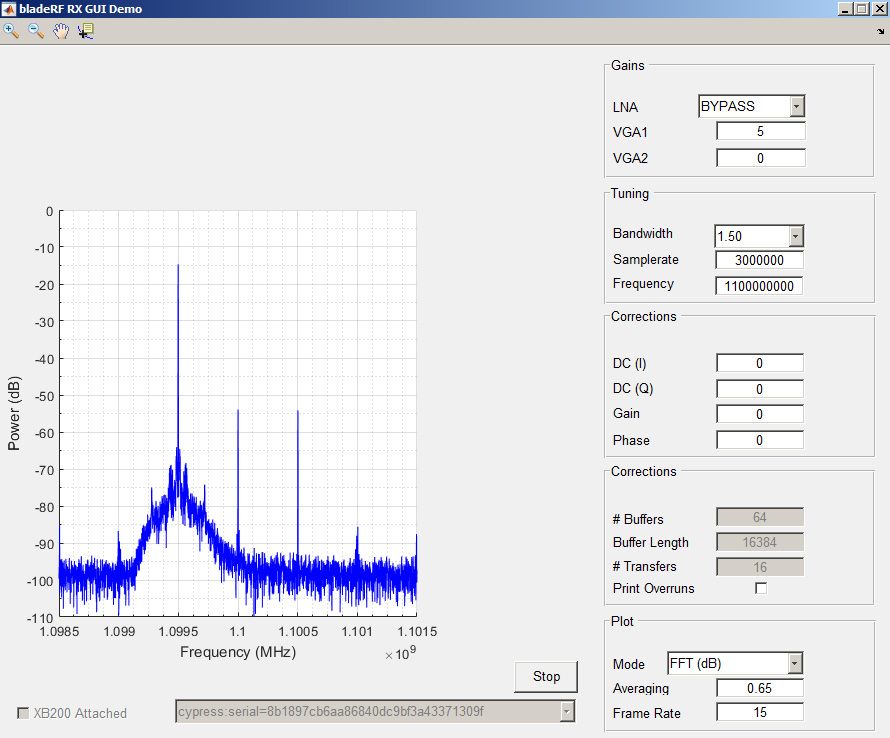
If I turn off the Synth all that is left is the center tone...and like I said it stays there no matter what I make the RX center frequency.
Anyway, at least I got this working. Cool! It's also nice to be able to ask about something I'm at least familiar with...for once.
Thanks
jom
Nonethless I've got the rx_gui working in MATLAB which is great.
I'm wondering, however, why there is always a tone dead center of the band I'm looking at. I saw this when I got SDR-Radio working last week and now I see it in the MATLAB gui. No matter where I put the RX input I get this -50 dB (dBm or dBFS?) spur right in the center of the FFT output. Why is that? Is the TX on and outputting a tone that is leaking into the RX or what?
Right now I also have a controlled synthesizer output going into the RX and it is clearly "beating" against this tone as I'm getting mixer spurs centered around it. Shown below. The Synth input is 1099.5MHz, 1100MHz is this odd tone and just above that is what I call a "mixer tone".
If I turn off the Synth all that is left is the center tone...and like I said it stays there no matter what I make the RX center frequency.
Anyway, at least I got this working. Cool! It's also nice to be able to ask about something I'm at least familiar with...for once.
Thanks
jom
-
jom
- Posts: 23
- Joined: Tue Jul 19, 2016 10:08 pm
Re: Questions from a beginner
OK, thanks...I should have known that but I'm so used to Superhets I didn't catch that. I'll see if I can figure out how to play with the offsets to adjust.
Also, any thoughts on the MATLAB Toolbox blockset issue I asked about. I know you are busy but I don't know how to proceed with that.
Thanks again!
jom
Also, any thoughts on the MATLAB Toolbox blockset issue I asked about. I know you are busy but I don't know how to proceed with that.
Thanks again!
jom
-
jom
- Posts: 23
- Joined: Tue Jul 19, 2016 10:08 pm
Re: Questions from a beginner
Thanks for the reply!
Thanks!
jom
I was trying to follow the guide here: https://libraries.io/github/Nuand/Simul ... AB-bladeRF I had assumed that it was "up to date". There were some broken links in the section "Build/Install instructions for Microsoft Windows". That's where my confusion came from.jynik wrote:Hi jom,
1. Simulink-MATLAB-bladeRF is deprecated, so you can ignore this project entirely. MATLAB and Simulink support was entirely re-written using the loadLibary() interface, and this supersedes this. Thus, there is no more make.m or anything pertaining to generating blocks.
I'll take a look at the file in MATLAB and see what I can figure out what you mean here.2. Simulink support is now provided as MATLAB System Object, implemented in this file: https://github.com/Nuand/bladeRF/blob/m ... Simulink.m
2a. A System Object essentially exposes a Simulink block interface atop of some MATLAB code. The aforementioned file is just glue logic "hooking up" simulink to the bladeRF MATLAB interface.
I'm not sure what a Thunk file is but I'll see what I can find.3. The only thing to "build" now is the Thunk files -- this is a dynamic library wrapper around libbladeRF that exposes API functions to the MATLAB code.
Thanks!
jom
-
jom
- Posts: 23
- Joined: Tue Jul 19, 2016 10:08 pm
Re: Questions from a beginner
I'm still having issues with my bladeRF device and that IQ issue. I must not understand what is going on here as well as I should.
First of all, I tried adjusting the IQ offset using the MATLAB gui interface and only got the tone down to -60dB or so. I don't know if I can do better nor do I know if that is enough to prevent the distortion I'm seeing. It's not my signal generator as I checked it out on my spectrum analyzer. I either don't know how to adjust this IQ issue properly, I've got another setting that is creating some other distortion internally (such as too much VGA gain), the bladeRF MATLAB gui can't do what I need to do to fix this or there is something wrong with the board I'm using.
This part of the forum may not be the proper place for this issue so I apologize in advance...
Again, thanks for all of the help.
jom
First of all, I tried adjusting the IQ offset using the MATLAB gui interface and only got the tone down to -60dB or so. I don't know if I can do better nor do I know if that is enough to prevent the distortion I'm seeing. It's not my signal generator as I checked it out on my spectrum analyzer. I either don't know how to adjust this IQ issue properly, I've got another setting that is creating some other distortion internally (such as too much VGA gain), the bladeRF MATLAB gui can't do what I need to do to fix this or there is something wrong with the board I'm using.
This part of the forum may not be the proper place for this issue so I apologize in advance...
Again, thanks for all of the help.
jom
-
bpadalino
- Posts: 303
- Joined: Mon Mar 04, 2013 4:53 pm
Re: Questions from a beginner
-60dB worth of image rejection is pretty good. It's not great if you're doing SSB, but do you need more than 60dB of SNR to get your signal across?
I am not sure if you have an issue with DC offset or IQ imbalance, but try also looking at the time domain samples.
What exactly is the issue you are trying to solve and do you know how good is good enough?
Brian
I am not sure if you have an issue with DC offset or IQ imbalance, but try also looking at the time domain samples.
What exactly is the issue you are trying to solve and do you know how good is good enough?
Brian